
Presentation Management
The right presentation. In the right room. At the right time.
Speakers upload presentations through a branded portal while your team manages every deck from a single dashboard. Review content, track revisions, approve updates, and know exactly what's headed to every room—without endless email chains, shared drives, or last-minute surprises.
Presenter Portal
Four letters, and they’re in.
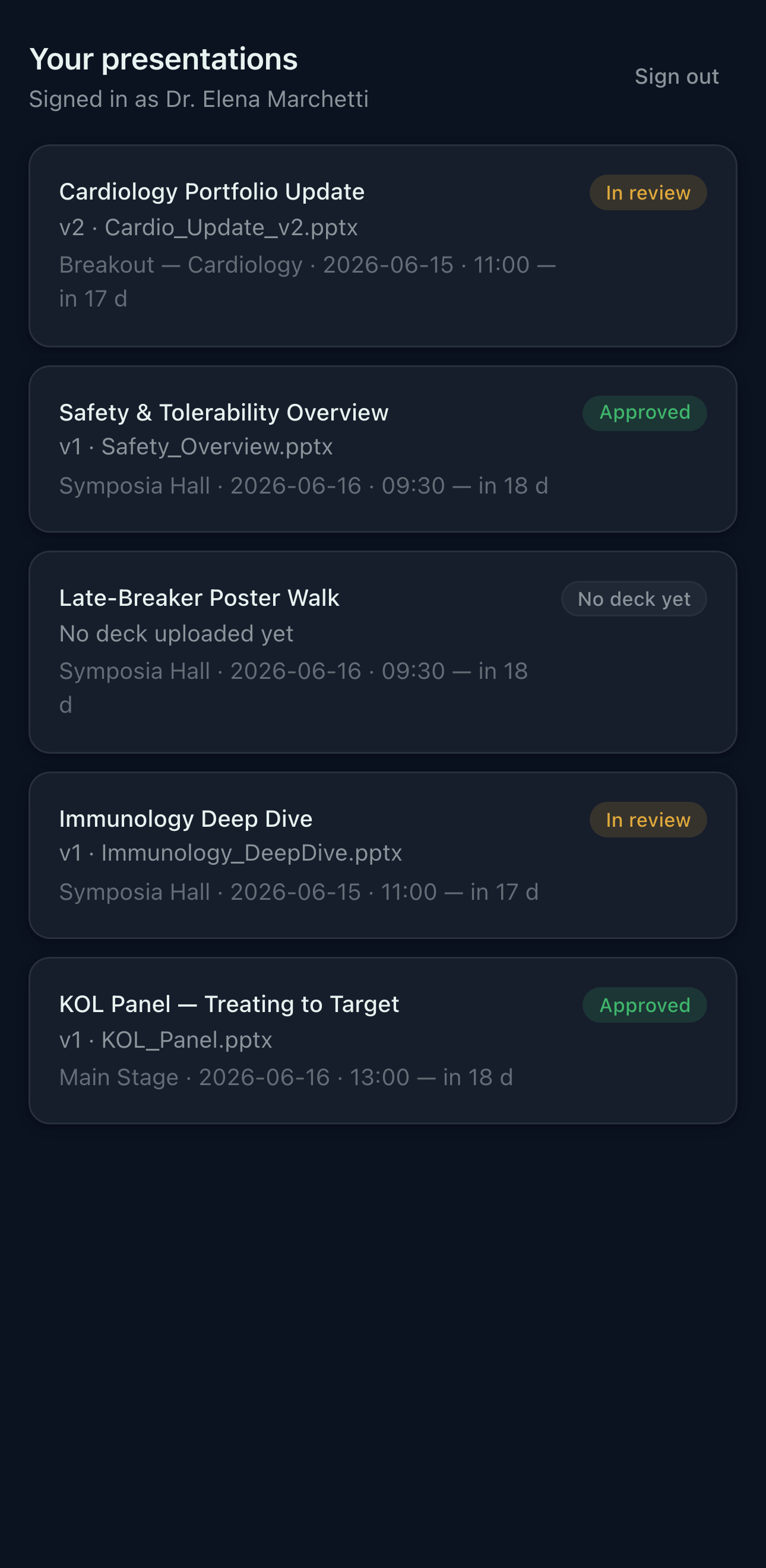
Weeks before the show, every speaker receives a simple and unique 4-letter PIN. From any device, they can upload presentations, review requirements, see producer feedback, and keep track of their session details in one place. No accounts to create, no passwords to reset, and no chasing presentation files through endless email threads.
- A 4-letter PIN — that’s the whole login
- Upload presentations from any device, with full version history preserved
- Producer feedback and approval notes, right on the slide
- Session details, room assignments, and recordings—all in one place
Slide Track · Patent pending
Notes that follow the slides — even when the slides move.
Presentations evolve. Slides get reordered, updated, added, and removed as speakers refine their content. Normally, that means feedback and review notes can become disconnected from the slides they were meant for. Slide Track automatically follows presentations from one version to the next, keeping notes attached to the right content—even when the deck changes.
Feedback follows the content. Slide numbers change. Notes stay where they belong.
Changes don't hide. Modified slides are automatically flagged for review.
Compare versions side by side and instantly see what changed
The producer board
Every speaker. Every deck. One dashboard.
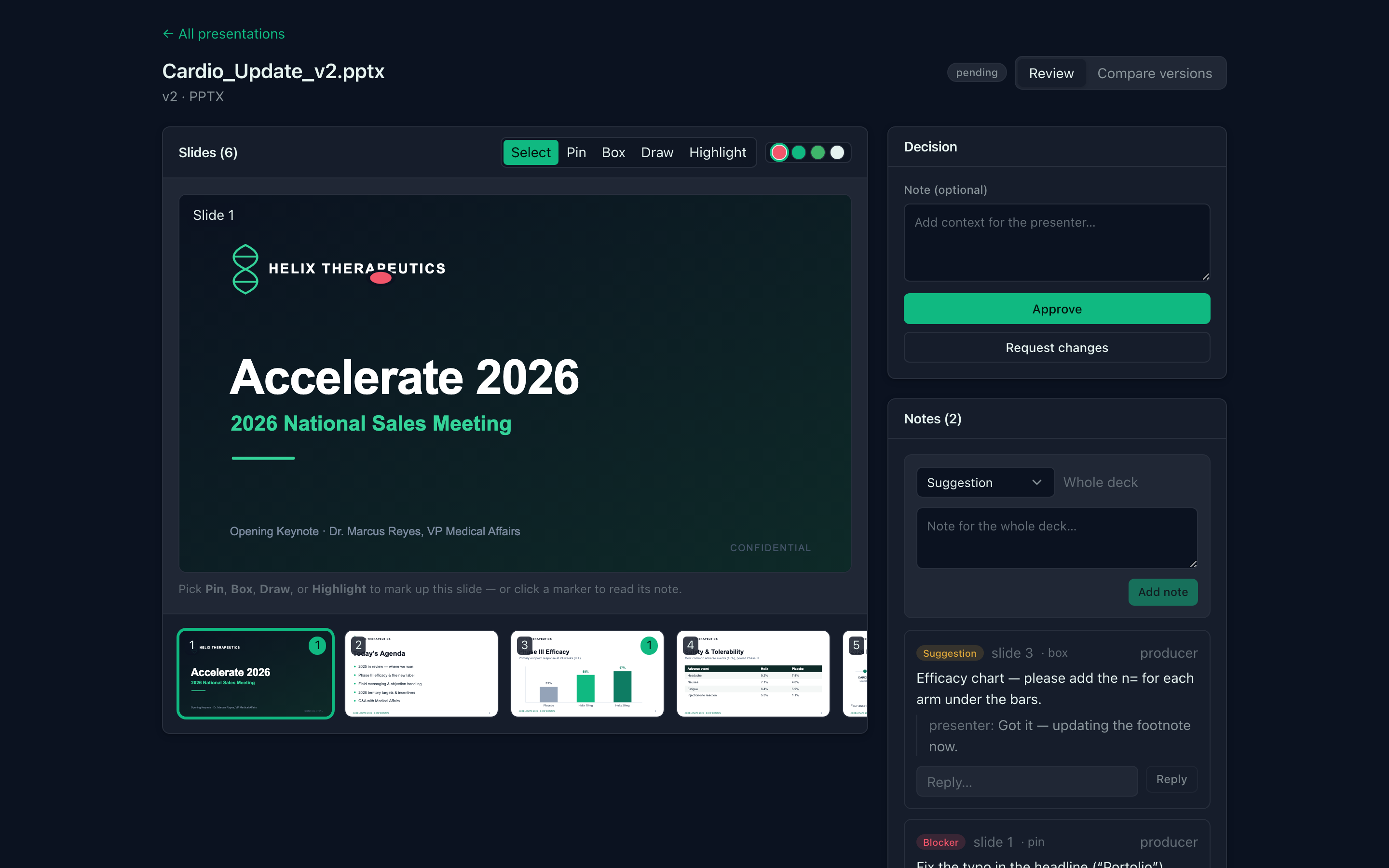
The Producer Board gives your team a live view of every presentation across the event. See what's been uploaded, what's awaiting review, what's approved, and what's still outstanding. Review slides, leave feedback, compare versions, approve content, and track progress across every room—all from a single dashboard.
- Filter by room, presenter, session, or day.
- Review directly on the slide
- Leave feedback exactly where it's needed.
- Approve with confidence
- Track revisions, compare versions, and manage approvals.
- Built for confidential content
- Event-level security keeps presentations protected.
The custom Presenter View
A Presenter View that adapts to the speaker.
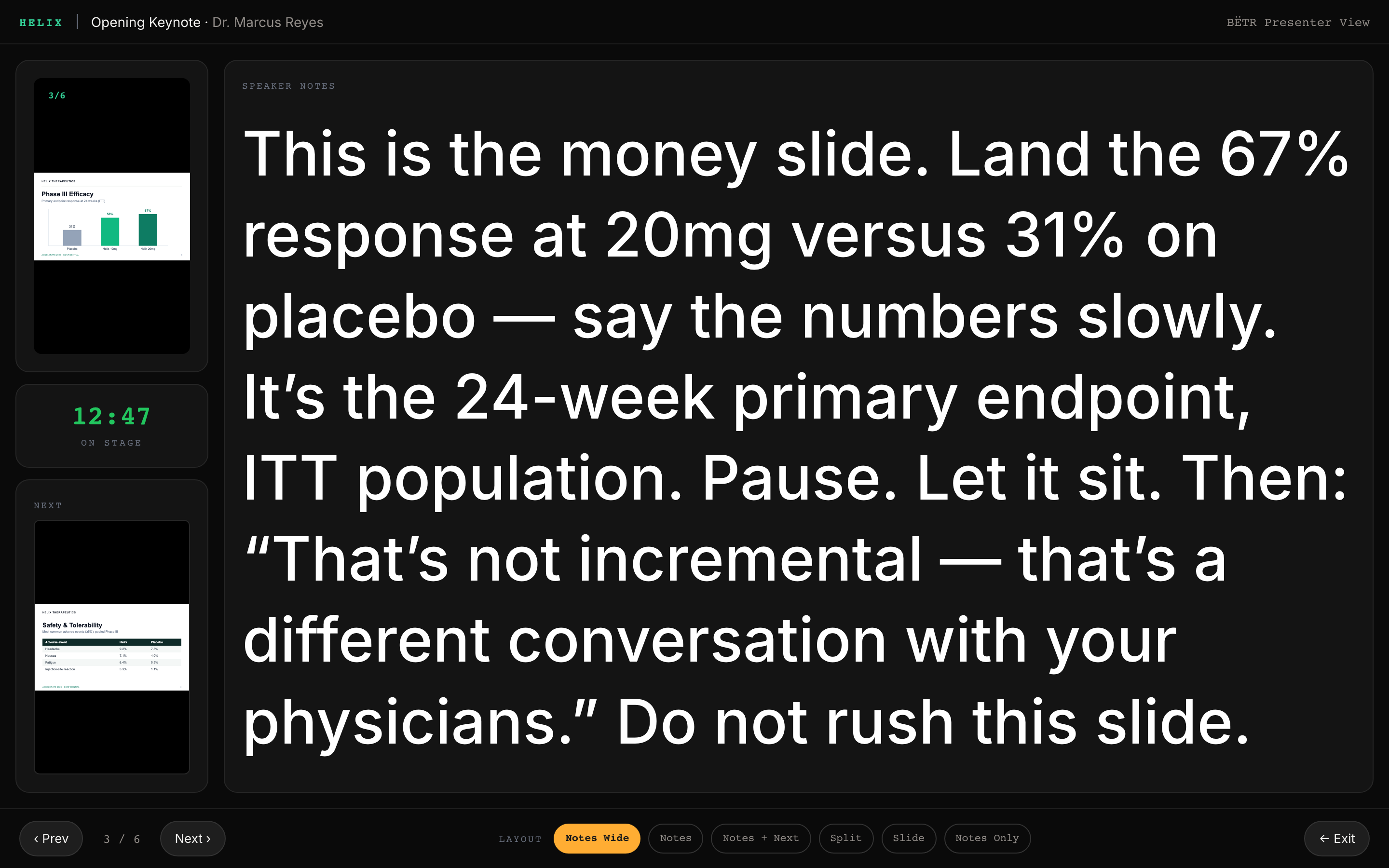
Every presenter has different preferences. Some want larger notes. Others want a prominent timer or fewer on-screen distractions. BËTR's custom Presenter View adapts to the speaker, not the other way around.
Notes that auto-scale to fit.
Presenter View shows speakers exactly what they need: their live slide, notes, timer, and upcoming content. Notes automatically scale to fit the available space, helping presenters stay comfortable and confident regardless of how much content appears on the page.
- Presenter preferences follow them from Speaker Ready to the room
- Notes automatically scale to remain readable
- Notes-first, slide-first, split-screen, or fully customized layouts
- Lives exclusively on the confidence monitor
Speaker-ready room
The on-stage experience starts in Speaker Ready.
Speaker Ready gives presenters a replica of the breakout room experience before they take the stage. They can rehearse their presentation, customize Presenter View, review timing, and make last-minute content updates. With a simple 4-letter PIN, presenters can upload new versions, access previous versions, and manage their content from self-service kiosks. Friendly, experienced technicians are always available to help.
ONE WORKFLOW. EVERY ROLE.
Built for every stakeholder.
Your speakers
Upload, rehearse, and stay informed. Presenters can submit presentations, review feedback, rehearse in Speaker Ready, and access recordings after their session—all with a simple 4-letter PIN.
Segment Producers
Own a room or an entire content track. Monitor presentation status, review content, provide feedback, and keep speakers on schedule across the rooms and sessions assigned to you.
Reviewers
Review content where it matters. Leave comments directly on slides, flag issues, and collaborate with presenters without long email threads or disconnected review documents.
Overall producer
See the entire event at a glance. Track uploads, approvals, reviews, and outstanding presentations across every room from a single dashboard.
Stop managing presentations the hard way.
See how BËTR helps speakers, reviewers, producers, and content teams stay aligned from upload to showtime.